
Welcome to the Jobodex beta! Thank you for helping test the app. (Detailed changelog.)
To keep feedback focused and useful, please pick one or more of the Focus Tracks below. Each track should take about 10–20 minutes.
Beta 3 (Sept. 5, 2025)
This beta focuses on improved share extension and URL parser imports and auto-tagging of job descriptions, which happens in-app and on-device. This is a key feature of the app so this beta has only one test track.
This test will take about 20 – 30 minutes.
Task 1: Use share extension or URL parser to capture at least 3 job leads from your job board of choice (using more than one job board is even better)
- IMPORTANT: You will not have 100% success getting a job description and that’s okay.
- Doing 8-10 captures would be fantastic; for any job leads that do not capture job title, organization/company, location and description, please send me the URL to the job board website. You can either email them or use this web form, https://jobodex.app/beta-tester-feedback/
- You do not have to go into the app after each share extension submission. The app queues them and waits until you go into the app to process them, so you can have multiple leads in the queue.
- The share extension and URL parser are both programmed to look for all the data it needs on the job lead page, but if the URL to actual job application page is provided it will also look there and provide the best result.
- After the job lead is created the app is programmed to go back and try to update the job title, organization/company, location and description after about 10 seconds to make sure it gets the best data. If it thinks it gets better data on the second pass it will update the entry automatically.
What to Watch Out For
If data is missing, please send me the job board site URL. It doesn’t have to be the specific job, just the job board. Either email me or submit via this web form, https://jobodex.app/beta-tester-feedback/
Task 2: Review and complete the detected skills section for each captured job lead
- If the job description is successfully imported the app’s auto-tagging function will automatically review the job requirements and propose hard and soft skills required for the job
- Review the skills and:
- Accept relevant skills, or
- Remove skills not relevant to the job, or
- Tell the app to ignore skills that would never be relevant to any job, or
- Add any skills you think the auto-tagger missed
- The app is seeded with about 1,000 hard and soft skills across the following industries:
- Digital & Tech
- Business & Finance
- Marketing & Sales
- Legal & HR
- Health Care
- Education
- Manufacturing & Engineering
What to Watch Out For
This is Auto-Tagger v1, so it may miss some things. Having you review and add skills will help your app learn and if you’re willing to submit some data to me (see below), it will help the whole app learn.
Task 3: Submit your added user skills and any auto-discovered skills you marked as “never use” (Optional)
- The auto-tagger uses on-device machine learning for this function and is greatly improved with more data.
- In App Settings > Skill Tuning (Beta) tap the “Export Skills Bundle.” This creates a .zip file you can email that contains any user skills you have added and any auto-tagged skills you have tagged as “always ignore.”
- That is all the file includes. There is no personally identifiable information or any other content (job leads, resumes, reminders, etc.) you may have added to the app. User privacy is foundational to me.
Task 4: Submit your 3 most used job boards (Optional)
- The share extension and URL parser can only be improved by fine-tuning it for more job boards.
- You can either email me or submit via this web form, https://jobodex.app/beta-tester-feedback/
Beta 2: (Aug. 28, 2025)
FIXED! AUG. 29 NOTE: version 0.5 Build 4 (the version released Aug. 28) seems to have broken iCloud sync. If you have been testing or using iCloud sync either stick to using 1 device or wait to test until I post an update, hopefully before noon today.
🎯 Focus Tracks
1. Job Lead URL Parser
- Use the paste link parser to create 3 or more job leads
- Use the share sheet importer from your browser to import 3 or more job leads
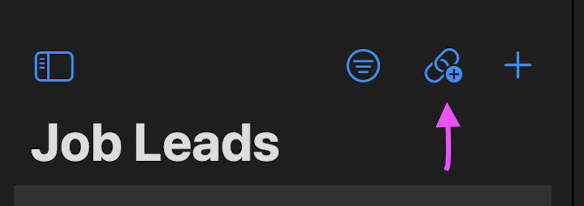
What to watch for:
Did the job title, company, location and job notice data come in without errors? Did any features behave unexpectedly? If the data did not come in without errors, please submit the job board you were using (and if you can submit actual URLs that would be great).
2. Share Sheet Importer
- Use the share sheet importer from your browser to import 3 or more job leads
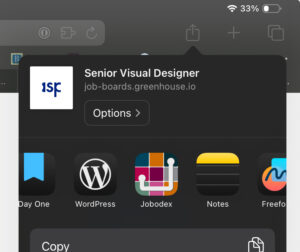
What to watch for:
Did the job title, company, location and job notice data come in without errors? Did any features behave unexpectedly? If the data did not come in without errors, please submit the job board you were using (and if you can submit actual URLs that would be great).
3. Add Resume from Job Lead
- Add a resume to a job lead when creating it
- Add a resume to a job lead when updating it
- Add a resume to a job lead when reviewing it
- Change their status once or twice
What to watch for:
Does it work? Are you able to add new summaries or work experience items?
4. Reminder Suggestions
- Create one or two job leads
- Change their status once or twice
What to watch for:
Do you find this less intrusive? Is the notification on status change noticeable? Is this a feature you would use?
📝 Feedback Tips
- Report bugs, confusion, or suggestions right after you finish a focus track.
- Include what you did, what you expected, and what happened.
- If possible, attach screenshots or screen recordings.
🚧 Not in Scope Yet
- Resume Importer
Thanks again for testing! Your feedback makes Jobodex better for everyone.
Beta 1
🎯 Focus Tracks
1. Job Lead Focus
- Create 3 Job Boards
- Capture 5 Job Leads
- Assign each Job Lead a different status (e.g., Captured, Applied, Interviewing, etc.)
- Explore how features change depending on status.
What to watch for:
Did status updates feel clear? Did any features behave unexpectedly?
2. Resume Builder Focus
- Enter your resume data into the Resume Builder sections (Work Experience, Education, Skills, etc.).
- Create a new Resume and review how your data is pulled together.
What to watch for:
Is data flowing into the resume as expected? Any missing sections or odd formatting?
3. Planning Focus
- Create 5 Reminders and 5 Events inside Jobodex.
- Turn on sync and confirm they appear in the Reminders and Calendar apps.
- Update items from both Jobodex and the native apps.
What to watch for:
Do changes sync both directions? Did any edits fail to carry over?
4. iCloud Sync Focus
- If you have both iPhone and iPad:
- Create a Job Lead, Reminder, Event, or Resume on one device.
- Confirm it appears on the other device.
- Try updating/deleting and check if the change syncs.
What to watch for:
Did data sync quickly and consistently? Any duplicate or missing items?
📝 Feedback Tips
- Report bugs, confusion, or suggestions right after you finish a focus track.
- Include what you did, what you expected, and what happened.
- If possible, attach screenshots or screen recordings.
🚧 Not in Scope Yet
- Resume Importer
- Polished Share Extension
Thanks again for testing! Your feedback makes Jobodex better for everyone.